MySQL has two column types for storing date and time: DATETIME and TIMESTAMP. They look similar on the surface but behave very differently when it comes to timezone handling.
DATETIME— stores the value as-is, with no timezone conversion on readTIMESTAMP— always stores in UTC internally, converts to system TZ on read
When the Datetime String HAS Timezone Information
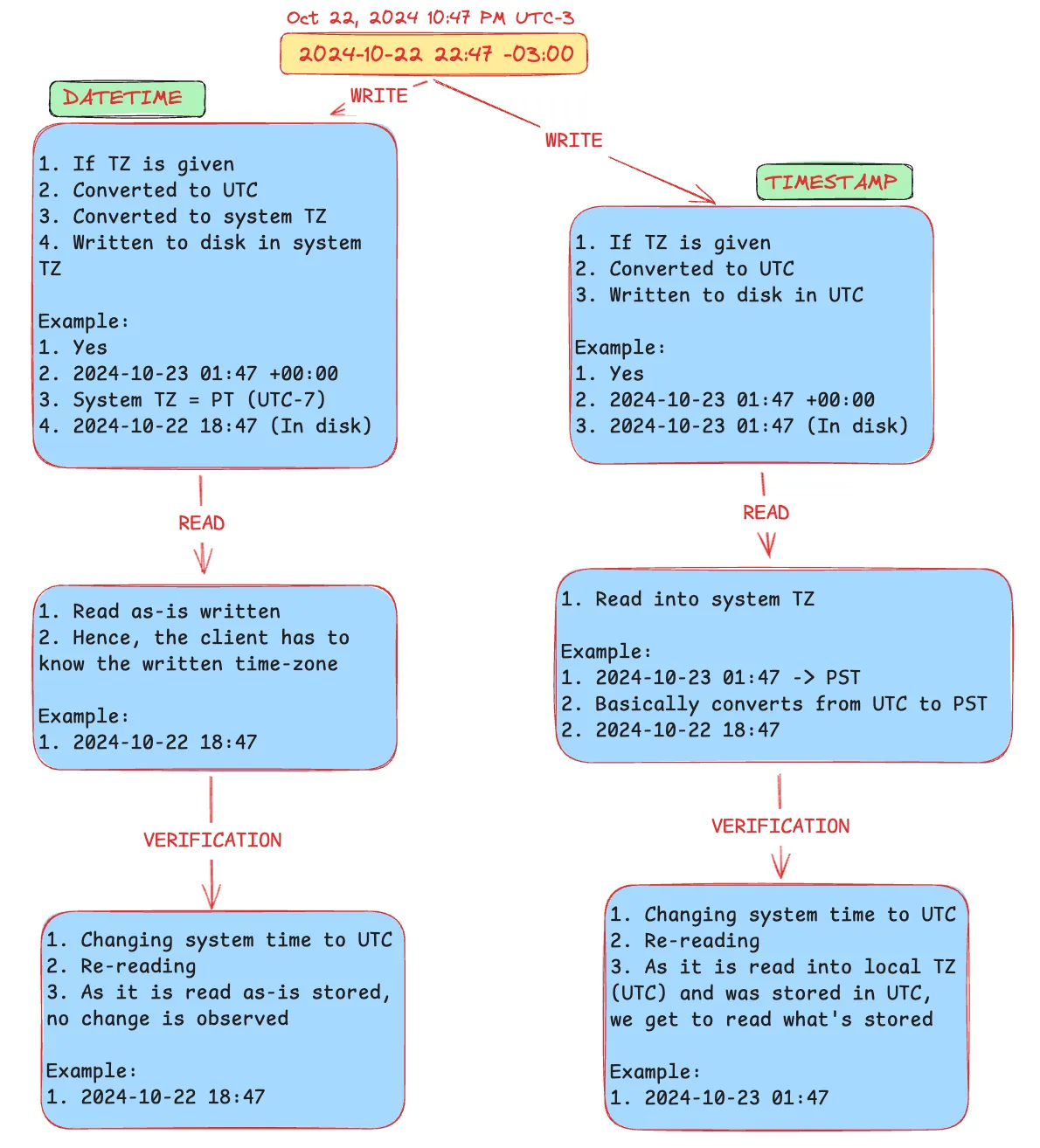 Take this example:
 2024-10-22 22:47 -03:00 (Oct 22, 2024 10:47 PM UTC-3)
DATETIME (Write)
- TZ is given
- Converted to UTC →
2024-10-23 01:47 +00:00 - Converted to system TZ (e.g. PT = UTC-7) →
2024-10-22 18:47 -07:00 - Written to disk in system TZ →
2024-10-22 18:47
DATETIME (Read)
- Read as-is from disk →
2024-10-22 18:47 - The client must know which timezone was used when writing
DATETIME (Verification — change system time to UTC, re-read)
- Still reads
2024-10-22 18:47— no change, because it’s stored as-is
TIMESTAMP (Write)
- TZ is given
- Converted to UTC →
2024-10-23 01:47 +00:00 - Written to disk in UTC →
2024-10-23 01:47
TIMESTAMP (Read)
- Read into system TZ (PT) →
2024-10-22 18:47 - Converts from UTC to PST automatically
TIMESTAMP (Verification — change system time to UTC, re-read)
- Now reads
2024-10-23 01:47— because it was stored in UTC and is now read in UTC
When the Datetime String has NO Timezone Information
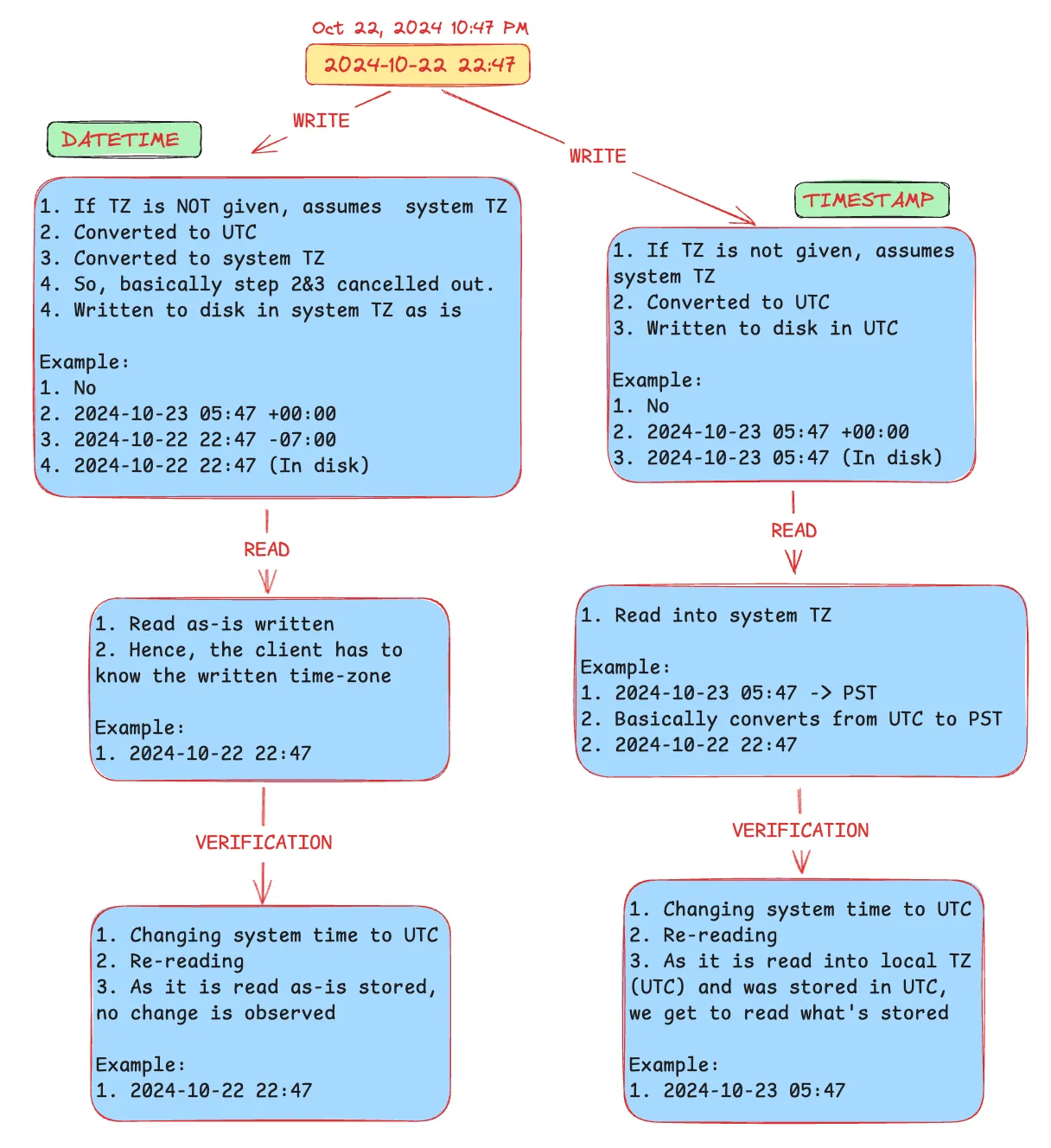
Take this example: 2024-10-22 22:47 (no TZ specified)
DATETIME (Write)
- No TZ given — assumes system TZ
- Converted to UTC →
2024-10-23 05:47 +00:00 - Converted back to system TZ →
2024-10-22 22:47 -07:00 - Steps 2 & 3 cancel out — written to disk as-is →
2024-10-22 22:47
DATETIME (Read)
- Read as-is →
2024-10-22 22:47 - Client must know the timezone context
DATETIME (Verification — change system time to UTC, re-read)
- Still reads
2024-10-22 22:47— no change, stored as-is
TIMESTAMP (Write)
- No TZ given — assumes system TZ
- Converted to UTC →
2024-10-23 05:47 +00:00 - Written to disk in UTC →
2024-10-23 05:47
TIMESTAMP (Read)
- Read into system TZ (PT) →
2024-10-22 22:47 - Converts from UTC to PST automatically
TIMESTAMP (Verification — change system time to UTC, re-read)
- Now reads
2024-10-23 05:47— stored in UTC, read in UTC
Summary
| DATETIME | TIMESTAMP | |
|---|---|---|
| Stored as | System TZ (as-is) | UTC always |
| Read as | As stored | Converted to system TZ |
| TZ-aware on read | ❌ Client must track it | ✅ Automatic |
| Changes with system TZ | ❌ No | ✅ Yes |
The key takeaway: if you need your timestamps to be timezone-aware and portable across systems, use TIMESTAMP. If you need to store a fixed wall-clock time regardless of where the server is, use DATETIME.